

January 29, 2026
Design with Real-Time Supply Chain Visibility

Share
BuildWithFlux


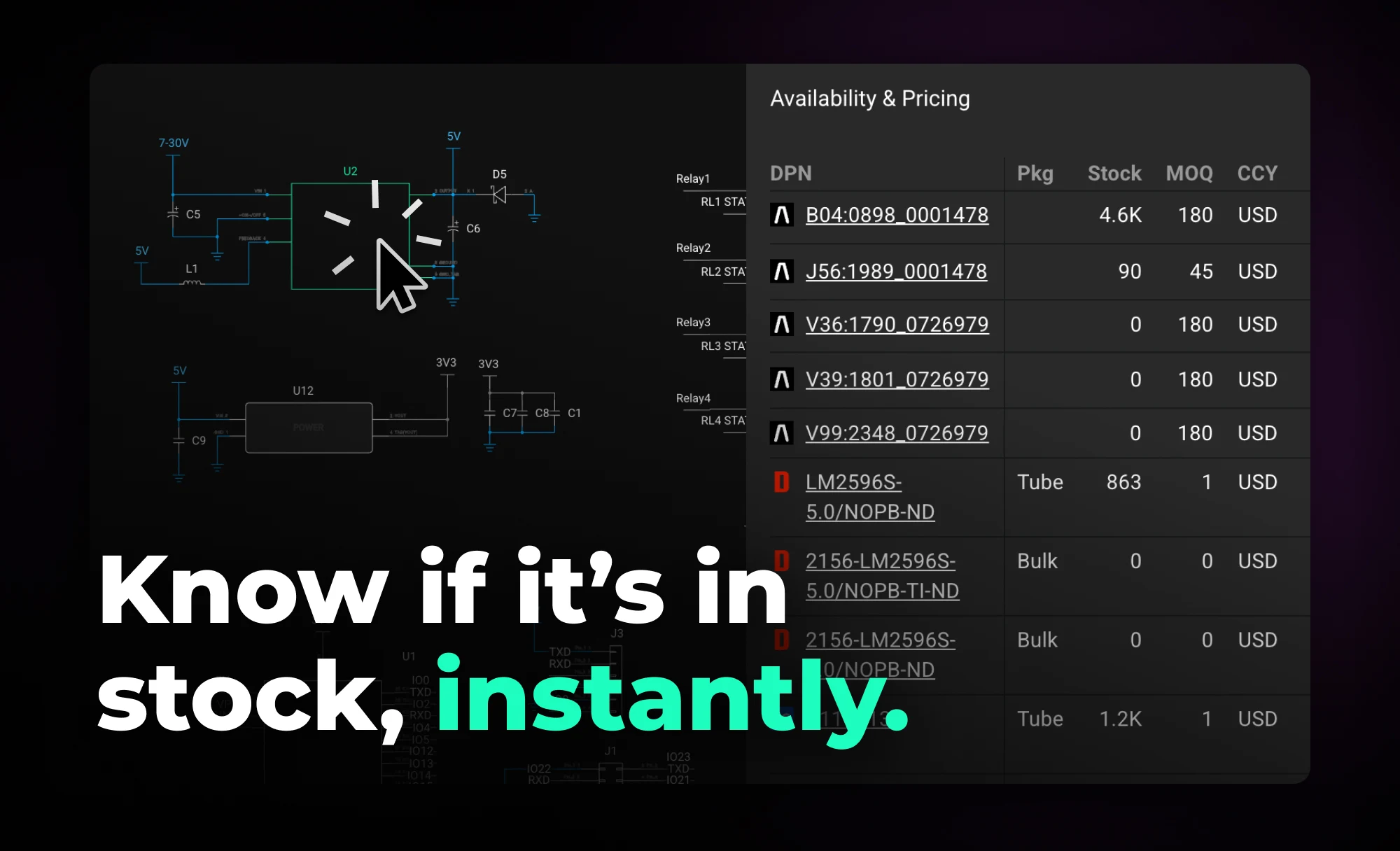


Flux takes a different approach. Instead of treating pricing and availability as a post-design concern, Flux keeps live supply data connected to your project as you work. Your project becomes a living document that stays aligned with the supply chain, surfacing constraints early—when decisions are still flexible and changes are cheap.
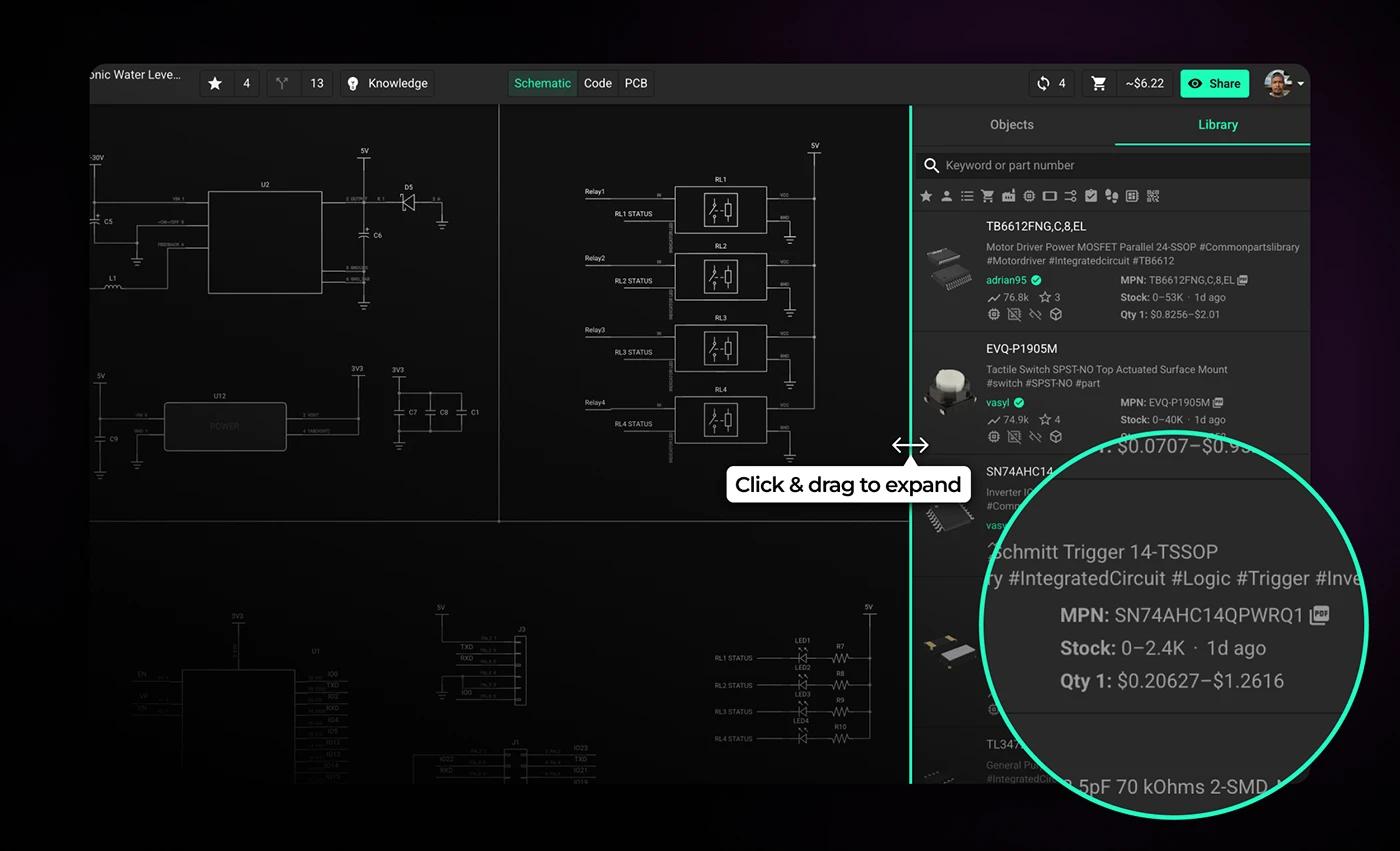
When you browse and select parts in the part library, Flux shows pricing and availability so you can spot sourcing constraints early. The Part Library panel is collapsed by default—expand it to see full pricing and availability details. You can also filter by stock status using the cart icon to show only available components.
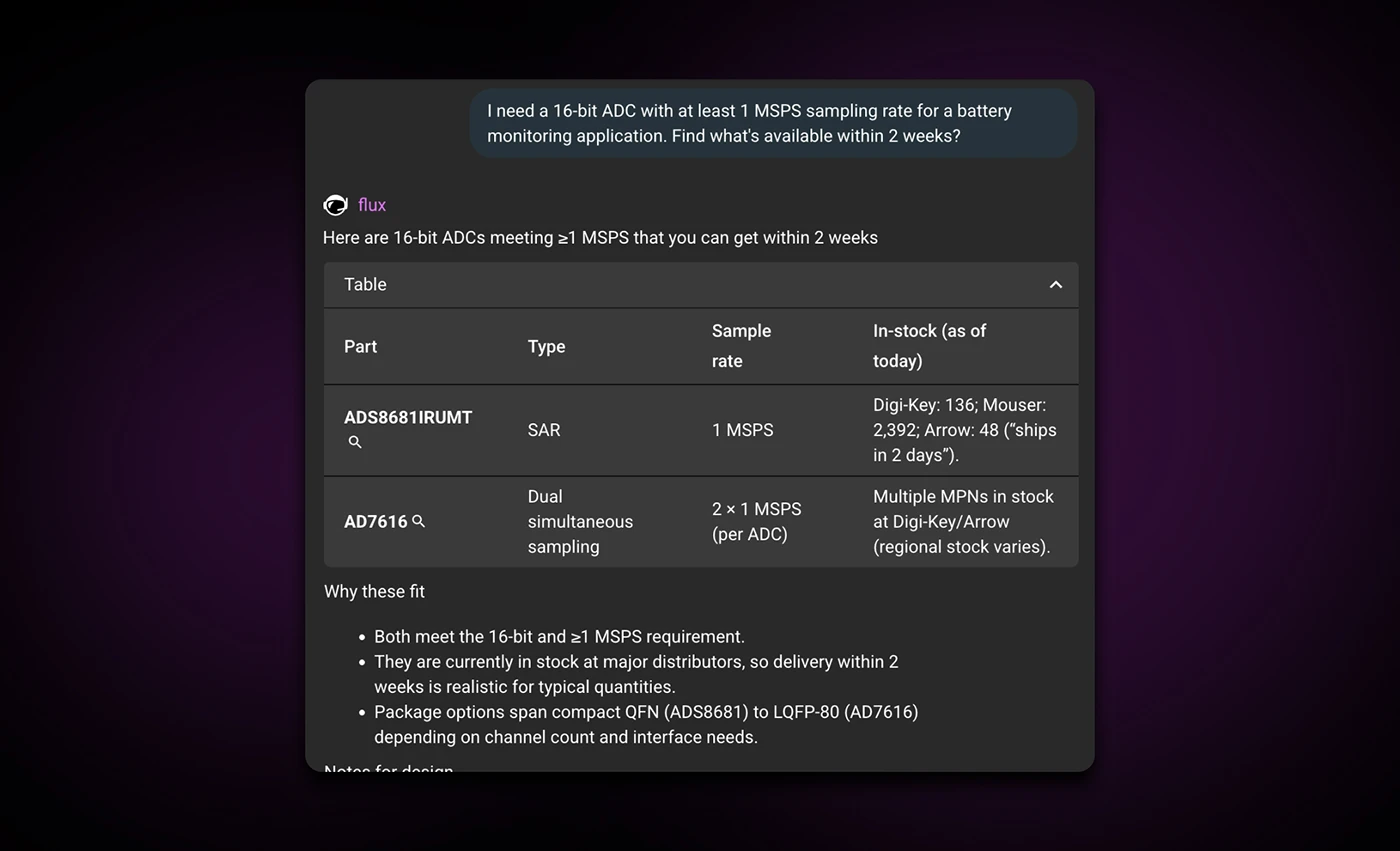
Ask Flux AI to find parts that are in stock—it searches real-time supply chain data and understands your full project context. Instead of manually checking distributor websites, you get parts from the library that match your requirements and constraints.
Example prompt:
"I need a 16-bit ADC with at least 1 MSPS sampling rate for a battery monitoring application. Find what’s available within 2 weeks?"
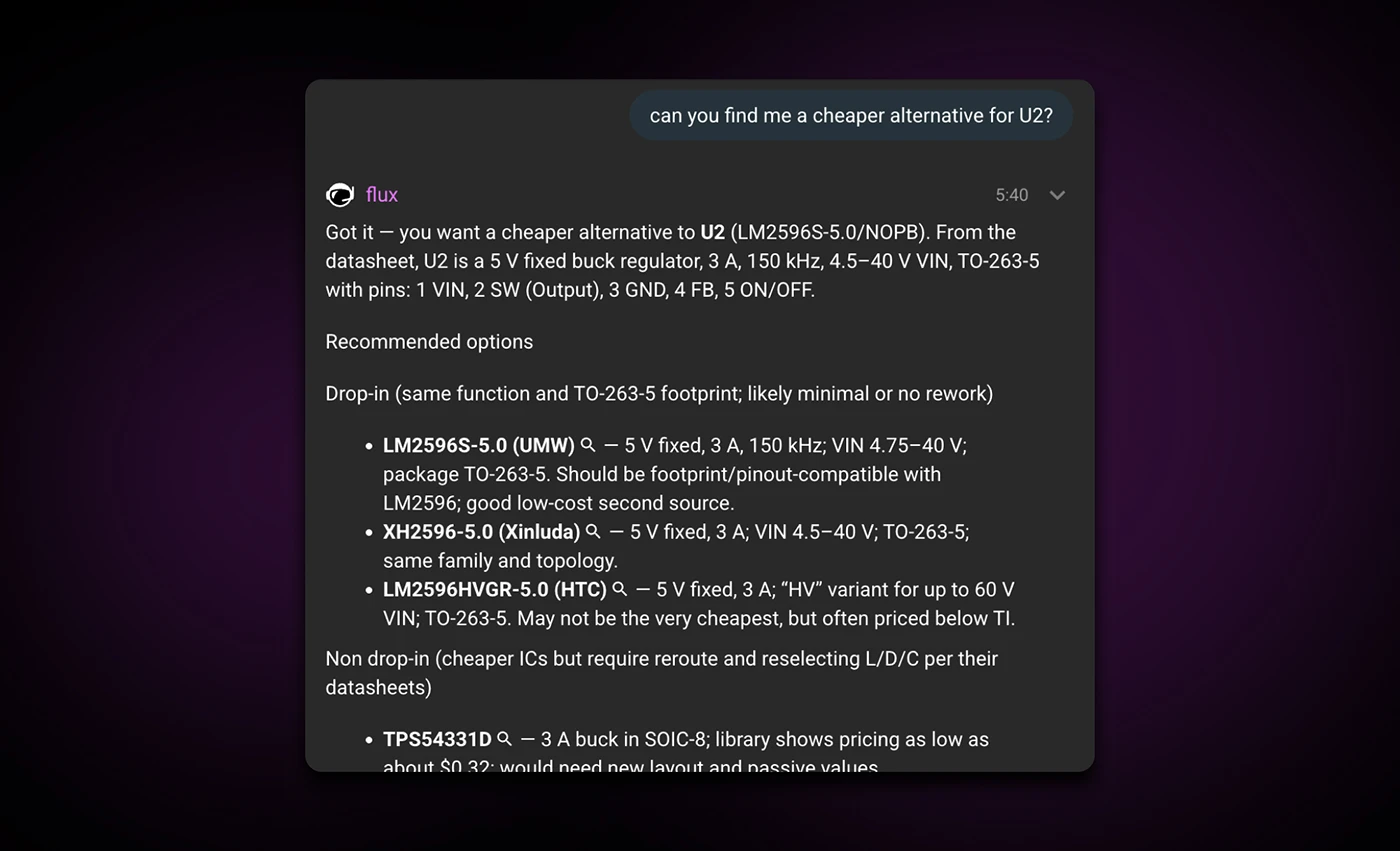
Ask Flux AI to find a replacement that's in stock. It understands your full project context, including what the part connects to, how you're using it, and your design requirements and constraints, and suggests parts with similar packages and specifications.
It prioritizes availability over minor price differences and recommends parts already in the library, so you don't have to build them from scratch. Once you select a replacement, Flux AI can automatically drop it onto the canvas and wire it up for you.
Example prompt:
"Can you find me a cheaper replacement for U2?"
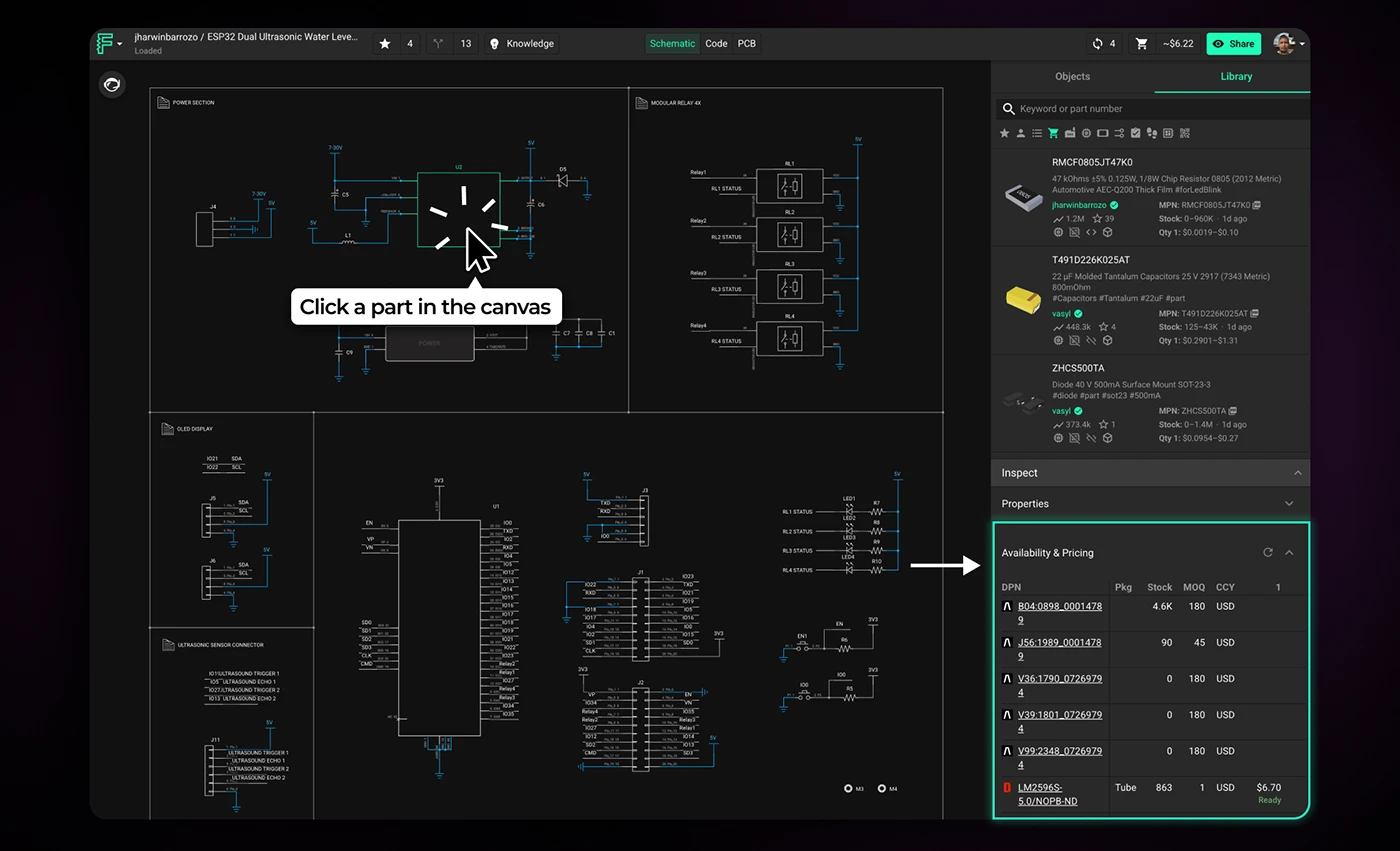
To check availability for a part, click on it in your design to open the inspector panel on the right. Scroll to the bottom, and you'll see real-time stock levels across multiple distributors—Arrow, Mouser, DigiKey, LCSC, Verical, and TME. This gives you a clear picture of whether a part is widely available or at risk of supply chain issues. If the part isn't in Flux's library, the system can search the broader internet to find availability data.
Note: You'll need a manufacturer part number (MPN) defined in the MPN property for generic parts.
Supply chain constraints don't go away once you've finalized your design—they just become more expensive to fix. The earlier you catch them, the more options you have.
Start treating sourcing as a design constraint, not a procurement problem. Check availability when you select parts. Let Flux AI flag risky components before you commit to a layout. And when something goes out of stock, find alternatives while you still have room to adjust.
The tools are already in your workflow. Use them before the BOM forces your hand.
{{try-it-in-flux}}
Flux takes a different approach. Instead of treating pricing and availability as a post-design concern, Flux keeps live supply data connected to your project as you work. Your project becomes a living document that stays aligned with the supply chain, surfacing constraints early—when decisions are still flexible and changes are cheap.
When you browse and select parts in the part library, Flux shows pricing and availability so you can spot sourcing constraints early. The Part Library panel is collapsed by default—expand it to see full pricing and availability details. You can also filter by stock status using the cart icon to show only available components.
Ask Flux AI to find parts that are in stock—it searches real-time supply chain data and understands your full project context. Instead of manually checking distributor websites, you get parts from the library that match your requirements and constraints.
Example prompt:
"I need a 16-bit ADC with at least 1 MSPS sampling rate for a battery monitoring application. Find what’s available within 2 weeks?"
Ask Flux AI to find a replacement that's in stock. It understands your full project context, including what the part connects to, how you're using it, and your design requirements and constraints, and suggests parts with similar packages and specifications.
It prioritizes availability over minor price differences and recommends parts already in the library, so you don't have to build them from scratch. Once you select a replacement, Flux AI can automatically drop it onto the canvas and wire it up for you.
Example prompt:
"Can you find me a cheaper replacement for U2?"
To check availability for a part, click on it in your design to open the inspector panel on the right. Scroll to the bottom, and you'll see real-time stock levels across multiple distributors—Arrow, Mouser, DigiKey, LCSC, Verical, and TME. This gives you a clear picture of whether a part is widely available or at risk of supply chain issues. If the part isn't in Flux's library, the system can search the broader internet to find availability data.
Note: You'll need a manufacturer part number (MPN) defined in the MPN property for generic parts.
Supply chain constraints don't go away once you've finalized your design—they just become more expensive to fix. The earlier you catch them, the more options you have.
Start treating sourcing as a design constraint, not a procurement problem. Check availability when you select parts. Let Flux AI flag risky components before you commit to a layout. And when something goes out of stock, find alternatives while you still have room to adjust.
The tools are already in your workflow. Use them before the BOM forces your hand.
{{try-it-in-flux}}



We’re excited to announce our partnership with Ultra Librarian to bring millions of high quality and trustworthy components directly to the Flux ecosystem. This partnership marks a big step towards bringing together all semiconductor manufacturers, distributors, engineers, and the whole hardware industry.

Hardware just got a little less hard. See how Flux reduces busy work, keeps your team in sync, and gives you AI superpowers.

Imagine an AI teammate that doesn’t just chat about your PCB ideas, but actively transforms them into schematics—placing parts, connecting circuits, and optimizing your design at your command, all through natural language. That’s exactly what the newly overhauled Flux Copilot does.

Now, Flux Copilot can learn how you work—your design principles, part selection preferences, schematic style guidelines, and testing workflows—and remember them automatically.

Increase your PCB design productivity with Flux Copilot's new AI shortcuts. Automate tasks, optimize designs, and reduce errors.

Today, we're thrilled to unveil Copilot Experts – a new suite of specialized AI models, each fine-tuned for specific tasks to deliver sharper accuracy and faster performance. Now, you have the power to easily select the AI model that best suits your current task, ensuring more precise and swift responses.

Whether you’re routing high-speed buses, fine-tuning antennas, or laying out clean RF filters, sharp 90º or even 45º angles can be a serious bottleneck. Now, you can create precisely curved elbows across entire nets—or dial them in trace by trace—with full control over radius, inheritance, and overrides.

Flux Copilot’s new AI-powered part search makes finding and placing components faster and easier using natural language. It eliminates tool-switching and datasheet overload. This streamlines your PCB design workflow.

Flux moves from one-off actions to executing multi-step workflows including researching parts, creating schematic designs, placing and routing, and running checks. Think of Flux as a capable intern — fast, explainable, and eager to learn, but still needing oversight and occasional help.

Today, we’re excited to introduce AI Auto-Layout, powered by Flux Copilot. This is the next step toward full layout automation. With just one click, Copilot tackles the repetitive task of routing your board, delivering clean, human-like results that are easy to work with and iterate on.

Testing plays a major role in minimizing errors during mass production, yet creating thorough test plans can be challenging and time-consuming.. That’s why we're excited to introduce AI-generated test plans and collaborative workflows, ensuring your hardware is manufactured error-free!

Avoid costly errors in your PCB design with these expert tips! Discover the 5 most common mistakes in trace width, vias, power planes, and more. Learn how Flux’s AI Copilot helps you catch these issues early, ensuring your board is ready for manufacturing.


